
5 key ingredients of great case study videos
Case study videos
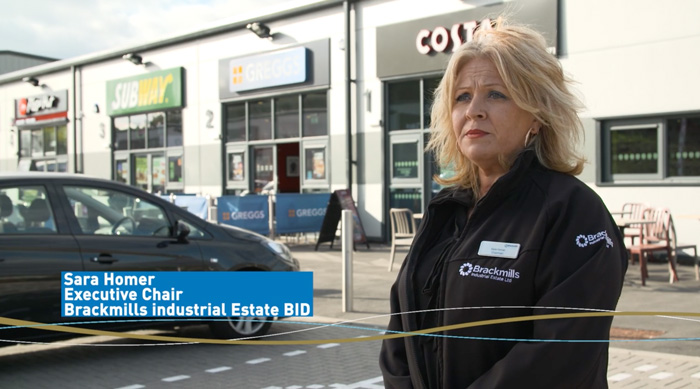
Case Study Videos (or testimonials if you prefer) are a key marketing tool for nurturing prospects along the buyer journey. You probably already have some or know you need them, but do you know the key factors in making a compelling one?
Asking a client to go on record and promote your products or services is a big ask. They are putting their own personal reputation on the line for you, taking time out of their schedule, and putting themselves in an environment they may not be very comfortable with.
Which means there’s a lot to be said for making your client feel comfortable throughout the whole process. Let them know what to expect, invest your time as well as theirs and check they are a happy customer before the process starts.
If you can tick those boxes you’re off to a good start and here’s 5 things you can do to make working with a video agency the easiest an
d most productive it can be:
Timing
Give your clients time to get to know your product and give meaningful opinions. Asking to interview them immediately after they’ve bought your product or service doesn’t give them a chance to use it, let alone state any figures about how much betteryou’ve made things for them. It’s far better to capture someone talking genuinely about their experience, sometimes even talking about the things that weren’t quite right. After all, it’s not how you make the sale that makes your reputation it’s how you respond when things aren’t quite right.
Onboarding
A call between you, your client and your video agency will prove invaluable when it comes to the shoot itself. You’ll all get acquainted with each other and more importantly set the tone for the interview. You can give your client a heads up on the questions you might ask, describe the day and advise them of any special requirements.
Does their site require protective clothing such as hardhats and steel toed boots or passport to enter secure areas?
Are there specific times the camera team need to be in and out of an area to get the shot you want?
Can your clients avoid close striped clothing to avoid moire on screen.
Same question, different answer
Stats about ROI and percentages of improvement are the golden ticket for a case study. But they are elusive, clients often feel uncomfortable quoting a figure or just don’t know. Don’t push them too hard, move on to another subject and come back to it in another way later. For instance; if you ask someone to state a percentage of time they’ve saved on a specific task with your services they might struggle to give you an answer. If you come back later asking how much of a typical day they spent doing that task before and after using your product you may well get a different response, which can be converted into the percentage you wanted to quote in the first place.
Be prepared
It’s just as important for the people behind the camera to have some understanding of the industry, the client, the product or service and any special information before hand. The interviewer needs to understand the questions they are asking and crucially the answers they are being given. Another reason to have that pre shoot conference call.
Have a process for the interview. Ensure you ask the basic stuff like name and job title, what they get involved with in their business. Why they like working there etc. Then ask them about what the company does, who are their major customers and what significant jobs have they done. Ask about their typical day, this is all about getting them comfortable behind the camera with questions they know the answers to. Then you can move on to the specific questions of why they were looking
And let them talk, once they are comfortable people often tell you a lot more and unexpected anecdotes often tell the best stories.
Let there be B-roll.
For the finished edit you’ll want something slick and professional that captures interest and crucially keeps it going to the end (usually about one and a half to two minutes). Having a single shot of a person talking for that length of time expects a lot from the viewer so it's best to have two cameras shots running simultaneously.
But it's also vital your camera crew has time to capture what’s known as B-roll. Shots of the environment, production lines, people using your products etc. This visual information keeps attention and also gives information to the viewer at the same time they are hearing the case study.
So, now you know. Keep these 5 hints on how to get great interviews in mind when working with a video agency and good luck.
Do you want to up your game with case study videos?
Download our case study checklist below or contact us to talk about your requirements:
studio@ar-media.co.uk or 01604 621600
Want to get in touch?


127 videos, 3 days, 20 cameras = IFS World Conference
127 videos, 3 days, 20 cameras = 1 happy client

The job:
In October 2019 AR Media was commissioned as video partner at the IFS World Conference in Boston, USA. A 3-day event bringing over 2,000 clients, partners, celebrities, and employees together to talk big business. We were both excited and privileged to be involved.
The client:
IFS are a global business software provider that enable manufacturers and service providers to optimise their business costs, processes, and offerings through intelligent information. The team at AR Media had worked with IFS for over 5 years and in 2019 we became a trusted partner in video production capitalising on our experience of their industry, their product and the events they organise.
But this time was a little different. This time our client wanted over 100 breakout sessions captured and edited. A daunting task.
Preparing for the world conference:
AR Media flew out a team of 8 comprising: camera operators, editors, and project managers, plus cameras, lights, and lenses. At the venue, we set-up basecamp with 4 edit suites and hired an additional 13 cameras and operators to cover all breakout sessions. With everything in place our teams split into 2; a mobile team ready to work with our client to record interviews, events and capture the conference atmosphere. The 2nd team focused entirely on capturing, backing up, and editing the breakouts after every session.
The IFS World Conference
As the event went live we were there to capture people arriving, visiting trade stands, attending keynote speeches, and networking.
We were setup in each room working with the on-site AV engineers to capture audio direct from the desk, and liaising with the AV team running the main stage to capture the Keynote presentations. Presenters included Tony Hawk, Tia-Claire Toomey, and Lewis Pugh.
Our mobile team were on call day and night, working closely with the IFS Marketing team to capture interviews on the fly, delegate reactions and soundbites about why they’d come and what they’d got from attending. Appreciation night had them working into the night capturing the atmosphere, networking, events, and live acts including Lewis Capaldi.
The breakout team were in action throughout the event, managing camera operators, filming every breakout session, juggling up to 13 simultaneous sessions and began editing on-site to deliver professional video of the presenters cut with the slides they presented.
In summary
Attendees are C-suite professionals from market leading manufacturers. They invest a lot of time and money coming to this event so it has to provide real, tangible value. IFS achieve this by providing a 3 day event packed with networking opportunities, world class keynote speakers, and access to IFS experts who can show them how to get the most out of their software.
AR Media’s remit is to provide a reminder of what attendees experienced, events from other parts of the conference they may have missed, and to give prospective clients an idea of why they should attend in the future. Or in simple terms; 127 videos, 3 days, 20 cameras and 1 happy client.
See the closing video at: https://vimeo.com/371641862
Are you planning a conference that requires video?
Download our event video checklist below or contact us to talk about your requirements:
studio@ar-media.co.uk or 01604 621600